Solving the Multilingual Keyboard Puzzle: Building TyperMate for macOS
For power users and multilingual writers, the keyboard is the most important tool. But on macOS, switching input methods can often feel slow or unpredictable. Over a weekend project, I collaborated with AI to build TyperMate, a premium utility designed to make macOS keyboard navigation feel exactly how you want it.
The Vision: Speed and Predictability
The goal was to create a tool that removes the friction from switching input methods and brings familiar keyboard shortcuts to the macOS ecosystem. We focused on three pillars:
- Instant Feedback: A visual popup that confirms your input method change without breaking your flow.
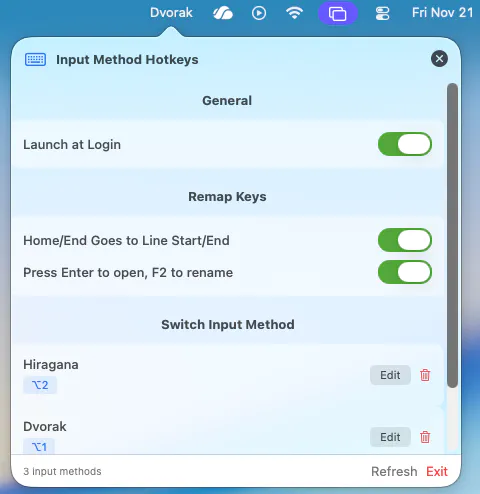
- True Global Hotkeys: Assigning dedicated keys to specific languages, moving beyond the “cycle-through” model.
- Privacy-First Architecture: A local-only utility that never phones home and keeps your keystrokes safe.
Core Features at a Glance
- Custom Per-Input Hotkeys: Define unique shortcuts for every input source in your system.
- Smart Confirmation HUD: A beautiful, translucent popup that appears right when you switch languages.
- Enhanced Navigation Suite: Bring Windows-style
Home/Endbehavior and Finder improvements likeEnter-to-open. - Ultra-Low Resource Footprint: Optimized to run in the background with near-zero CPU and memory impact.
Technical Deep Dive: Mastering the Accessibility API
The biggest challenge in building TyperMate was interacting with the macOS Accessibility API and the Core Graphics Event Tap.
⌨️ Event Interception
To implement features like Home/End remapping and Finder-specific shortcuts, we had to build a robust event interceptor. This layer monitors keyboard events in real-time and injects new events based on the active application and user preferences.
🛡️ Sandboxing and Permissions
macOS security is tight, especially around keyboard events. We spent significant time ensuring that TyperMate requests only the permissions it needs and handles the authentication flow gracefully for the user.
[!TIP] Implementation Note: We used a lightweight bridge to communicate between the Swift-based event handler and the localized UI strings, ensuring the tool remains fast and multilingual.
The Collaborative Experience: Building with AI
The complexity of macOS system APIs usually means long development cycles. Here’s how we accelerated it with AI:
- Swift Scaffolding: AI helped generate the Boilerplate code for the macOS menu bar app, allowing us to focus on the core logic.
- Hotkey Logic Optimization: We used AI to refine the logic that detects global hotkeys, ensuring they don’t conflict with system shortcuts.
- Error Handling: AI aided in identifying potential race conditions when many input methods are installed, creating a more robust switching engine.
The Project: By the Numbers
Building a system utility requires precision. Here’s what it looked like with agentic AI at the helm:
- Total Development Time: ~6 Hours (from concept to production-ready).
- Rounds of Iteration: 25 (refining UI, mapping logic, and performance).
- Manual Verification Cycles: 8 major rounds (ensuring stability across different macOS versions).
- Efficiency Gain: ~50% faster than manual system-level programming.
Final Thoughts
TyperMate isn’t just a utility; it’s about taking control of your most-used interface. By combining native macOS performance with modern AI-driven development, we’ve created a tool that feels like a natural extension of the OS.
Ready to try it? The project is live and open for review on GitHub, featuring a privacy-first core that prioritizes your data.