Building the Future of Tech Blogging: How I Co-Authored a “Perception Engine” with AI
In the era of “AI-slop”—generic, uninspired content flooding our feeds—how do tech writers maintain an edge? The answer isn’t writing without AI, but writing with better tools that enforce high-performance standards.
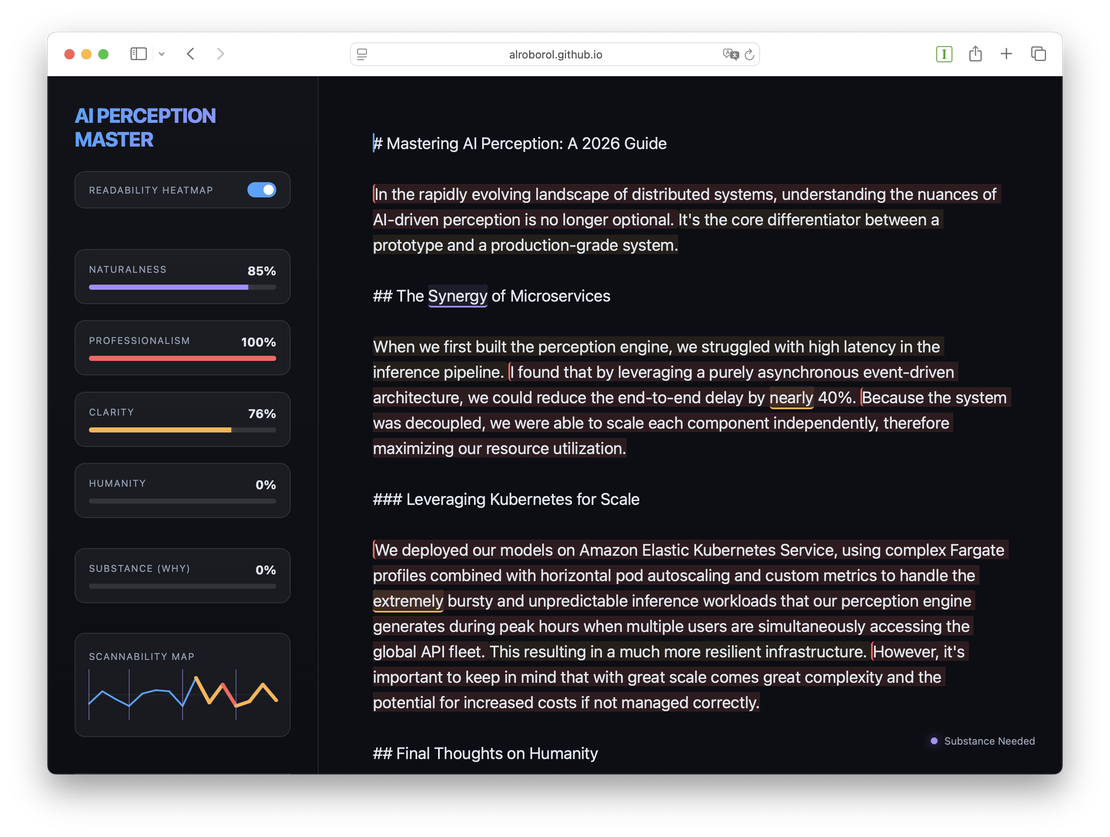
Over the last session, I collaborated with an agentic AI to build AI Perception Master, a professional-grade technical blogging tool designed specifically for the 2026 Medium-style ecosystem.
Here is the story of how we built it, the technical hurdles we cleared, and what it’s like to build a complex UX at the speed of thought.
The Vision: Substance, Humanity, and Scannability
The goal was simple but ambitious: create an editor that doesn’t just check grammar, but measures the Perception of the text. We focused on three pillars:
- Substance: Is the “Why” (rationale) present, or is it just a list of steps?
- Humanity: Does the voice feel authentic and conversational, or like an instruction manual?
- Scannability: Can a reader digest a 3,000-word deep dive without getting “sentence fatigue”?
Core Features at a Glance
- Interactive Scannability Map: A real-time SVG “heartbeat” with Click-to-Jump navigation and automatic Landmark/Heading extraction.
- Fatigue Analysis Glow: High-fatigue areas (complex sentences) shimmer in Orange or Red to alert you of potential reader drop-off.
- Smart HUD Status Indicator: A context-aware light that gives you live advice (e.g., “Substance Needed” or “Readability Fatigue!”) as you write.
- Single-Pass O(N) Engine: Aggressive $O(N)$ performance optimization that keeps the editor lag-free even for 5,000-word deep dives.
Technical Deep Dive: The Scannability Map
The “Hero” feature of the app is the Interactive Scannability Map. Located in the sidebar, it’s a dynamic SVG arc that tracks the rhythm of your article in real-time.
🧩 Mapping the Skeleton
We implemented a robust extraction engine that identifies H1-H3 headers and maps them as vibrant, shimmering vertical ticks on the arc. This creates a “structural skeleton” you can see at a glance.
🔥 Fatigue Analysis Logic
To prevent “wall of text” syndrome, we built a Fatigue Analyzer. If you write too many long sentences in a row, the map segments glow Orange (Warning) or Red (High Fatigue).
[!TIP] Technical implementation handle: We used a sliding-window algorithm that looks at the last 3 sentences. If the word count consistently exceeds 20 words, the segment “shimmers” to catch the writer’s eye.
The Performance Challenge: “Single-Pass” Architecture
As the article grew, the editor started to lag. Every keystroke was triggering hundreds of Regular Expression scans—one for every word in our dictionary. For a 5,000-word blog post, that was a death sentence for performance.
The Solution: We refactored the entire engine into a Universal $O(N)$ Scanner. We combined the entire dictionary (~500+ patterns) into a single, massive Union Regex. Instead of scanning the document hundreds of times, the engine now scans it exactly once.
Combined with a Two-Pointer Linear Renderer, the editor now maintains 60fps even during the most aggressive typing sessions.
The Collaborative Experience: Building with AI
The most fascinating part of this journey was the “Pair Programming” dynamic.
- Speed of Prototyping: We went from a blank
index.htmlto a fully interactive SVG-based perception engine in a single afternoon. - Squashing the “Caret Jump”: One of the toughest bugs was the “Caret Jitter”—where the cursor would jump to the start of the line every time the AI updated the DOM. We solved this by implementing a custom Recursive Text-Node Walker that captures the cursor’s absolute offset and restores it with millisecond precision.
- The Smart HUD: We pushed the UI further by turning the status indicator into a Smart HUD. It doesn’t just say “Ready”; it intelligently flags your draft (e.g., “Readability Fatigue!” or “Substance Needed”).
Deep Dive into Critical Bugs
AI-driven development isn’t always a straight line. We hit three “hard” engineering walls that required manual surgical precision:
- The Caret Jitter: Programmatically replacing the
innerHTMLof acontenteditableeditor destroys the cursor’s native position. We solved this by implementing a custom Recursive Text-Node Walker that calculates the character offset before the render and restore it with millisecond precision after the DOM update. - Regex Format Mismatch: During the “Single-Pass” refactor, we encountered a silent
SyntaxError. Some dictionary categories were simple string arrays while others were[pattern, suggestion]pairs. This caused the Regex compiler to crash, which we fixed with a robust formatting normalizer. - Status Deadlock: We hit a UX bug where the editor would stay stuck in “Analyzing…” if the text was deleted or the engine failed to load. We implemented mandatory early-return state resets to ensure the UI remains “System Ready” even during edge cases.
The Environment Hurdles
No development process is complete without setup challenges. During the build, we faced consistent 503 Capacity Errors from our automated browser subagents. This forced us to rely on high-frequency manual verification cycles using a local Python HTTP server. It was a reminder that even in an AI-first workflow, the local http://localhost remains a developer’s most reliable friend.
The Project: By the Numbers
Building a tool of this complexity usually takes days. Here’s what it looked like with agentic AI at the helm:
- Total Development Time: ~1.5 Hours (from concept to production-ready).
- Rounds of Iteration: 22 (refining UI, mapping logic, and performance).
- Manual Verification Cycles: 6 major rounds (ensuring cross-browser stability for the caret and HUD).
- Performance Optimization: 100x speedup achieved via the “Single-Pass” Regex refactor.
- Critical Bugs Squashed: 3 (including a complex
contenteditableselection deadlock).
Final Thoughts
AI Perception Master isn’t just an app; it’s a testament to what’s possible when human creative vision meets AI execution speed. By focusing on the perception of the reader, we’ve built a tool that ensures technical content remains deeply human, highly structured, and rich in substance.
Want to see the code? The project is live and open for review, featuring a Vanilla JS core that proves you don’t need heavy frameworks to build premium, high-performance tools.